
MIGRIS remains the central online system for submitting and managing Lithuanian citizenship applications. However, applicants using the platform in summer 2026 may notice changes in how they access their accounts, confirm their identity, and prepare documents for submission.
The updated MIGRIS environment increasingly separates two processes that applicants sometimes confuse. The first is verifying the identity of the person using the account. The second is verifying the legal relevance and authenticity of the documents supporting a Lithuanian citizenship application.
Completing MIGRIS identity verification does not confirm eligibility for citizenship. Similarly, successfully uploading a document does not necessarily mean that the document has been legally accepted or that the original will not need to be presented later.
Understanding this distinction can help U.S.-based applicants avoid technical problems, incomplete submissions, and inconsistencies between their online application and physical document package.
In short
- MIGRIS remains the online system for Lithuanian citizenship applications.
- Account identity verification (the MIGRIS app and a QR code) is separate from verifying your documents.
- Uploading scans does not remove the need to present originals or certified copies when MIGRIS asks.
- Official consular guidance sets four months from the Migration Department’s notification to present originals in restoration cases.
- Pending applications do not need to be filed again unless MIGRIS instructs you to.
What the MIGRIS 2026 Updates Mean for Citizenship Applicants
One of the most visible MIGRIS 2026 updates is the introduction of a stronger mobile-based identity verification process. The current portal environment promotes the MIGRIS mobile app and displays a process in which a user may connect the app to the website by scanning a QR code and confirming their identity on a mobile device. The precise prompts may depend on the account, identity document, device, and service being accessed.
For citizenship applicants, this means that access to the application environment may require more than entering an email address and password. Some users may be asked to complete an additional identity check before they can fully use their MIGRIS account or continue with a selected service.
This is primarily an account-security and applicant-identification measure. It should not be interpreted as a change to the substantive rules governing Lithuanian citizenship restoration, citizenship by descent, or dual citizenship.
The document workflow also remains evidence-based. Citizenship applications are submitted electronically through MIGRIS, but applicants may still need to present the originals of uploaded documents to the Migration Department or a Lithuanian diplomatic mission for verification.
The practical change is therefore not that citizenship cases have become entirely digital. Instead, identity verification is becoming more closely integrated into the online account, while documentary verification continues through a combination of digital submission, preliminary review, and examination of original or properly certified records.
MIGRIS Identity Verification and Document Verification Are Different
MIGRIS identity verification is intended to establish that the person accessing the account is the person associated with the identity details being used. It may involve the MIGRIS mobile app, a QR code displayed on another device, and additional steps presented within the application.
Lithuanian citizenship document verification serves a different purpose. It allows the authorities to examine whether the documents support the facts stated in the citizenship application.
For example, the applicant’s passport can help establish the applicant’s current identity. Birth, marriage, naturalization, archival, military, residence, or emigration records may be required to establish the family relationship, an ancestor’s historical Lithuanian citizenship, departure from Lithuania, or changes in names and surnames.
A successful mobile identity check does not validate the applicant’s family tree. It also does not confirm that an ancestor was a Lithuanian citizen, that a particular emigration history qualifies under the applicable citizenship rules, or that the applicant may retain another citizenship.
Those questions are examined through the citizenship application and its supporting evidence.
| Identity verification | Document verification | |
|---|---|---|
| Purpose | Confirms who is using the MIGRIS account | Checks whether documents support the facts in the application |
| How | MIGRIS mobile app, QR code, on-screen prompts | Uploaded scans, then originals or certified copies |
| Proves eligibility? | No | It is part of the eligibility review |
| Who completes it | The applicant personally | Applicant, with help from a representative if needed |
How MIGRIS Mobile App Identity Verification May Work
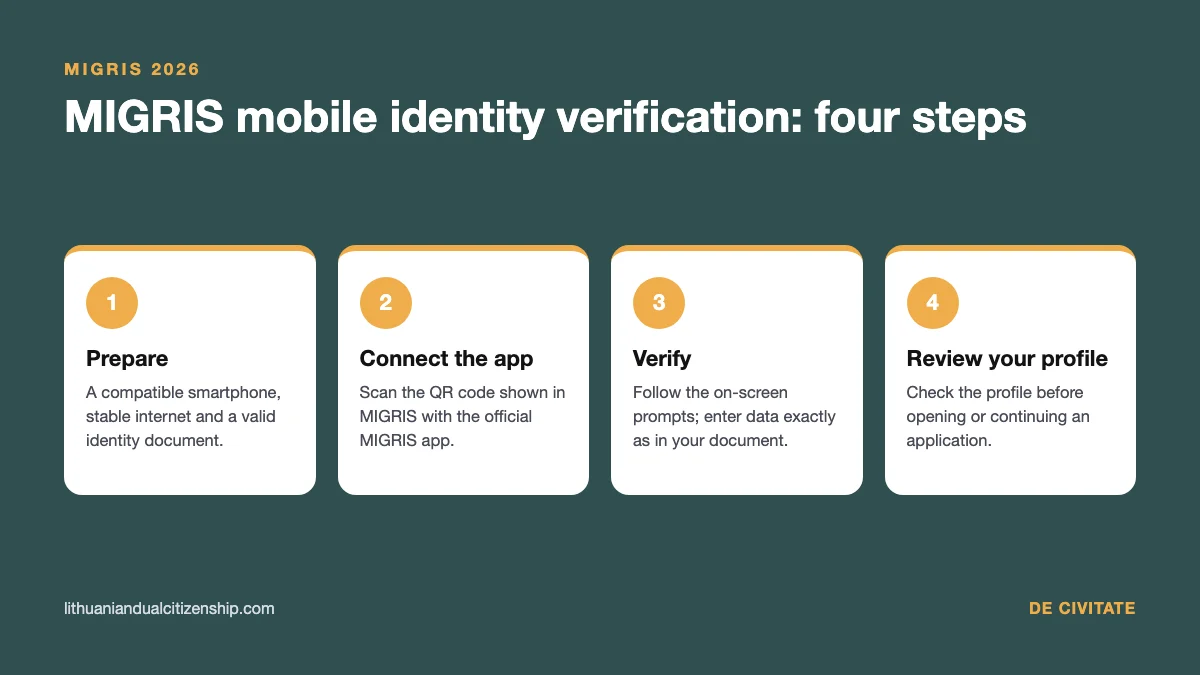
The exact MIGRIS mobile app identity verification process may change as the system is developed. Applicants should therefore follow the current instructions displayed in their own account rather than relying entirely on older screenshots or third-party tutorials.
The general process may involve opening MIGRIS on a computer or another device, selecting the relevant verification method, scanning the displayed QR code with the MIGRIS mobile app, and completing the identity confirmation steps on the phone.
Prepare Your Device and Identity Document
Before beginning, the applicant should have access to a compatible smartphone, a stable internet connection, and a valid identity document. The information entered into MIGRIS should correspond to the information shown in that document.
Applicants with multiple passports should pay particular attention to which passport is used for account verification and which passport is identified in the citizenship application. Using different documents is not necessarily prohibited, but unexplained inconsistencies may create questions.
Names, dates of birth, document numbers, and citizenship details should be entered accurately. A missing middle name, a transliteration difference, or a surname that changed after marriage may require explanation elsewhere in the application.
Connect the Mobile App to MIGRIS
When the portal displays a QR code, the applicant may need to scan it through the MIGRIS mobile app rather than through an unrelated QR-code reader. The app and browser session should remain open until the connection is completed.
A QR code may be temporary. If it expires, the applicant may need to generate a new code and repeat the connection process.
Applicants should avoid sharing the QR code, login credentials, or verification session with another person. A citizenship representative may help prepare documentation, but identity confirmation should normally be completed by the person whose identity is being verified.
Complete the On-Screen Verification
The app may ask the user to confirm identity information or complete additional document and camera-based steps. The exact sequence can vary, so the applicant should read each prompt carefully and provide only the information requested by the official MIGRIS interface.
Good lighting, a clean camera lens, and an unobstructed identity document can reduce technical errors. The applicant should also check that the document is valid and that the personal information remains clearly readable.
If the process fails, the applicant should not repeatedly enter different versions of their personal data merely to pass the verification. It is safer to confirm that the information matches the identity document and then follow the technical support instructions provided by MIGRIS.
Return to the Online Account
After the mobile verification is completed, the browser session may update automatically or require the applicant to confirm that the process has been completed.
The applicant should then review the profile information before opening or continuing a citizenship application. An error in the profile can later appear as an inconsistency in the application form.
How MIGRIS Document Submission Requirements Work in 2026
The MIGRIS citizenship document upload requirements should be understood as part of a structured evidence submission, not as a simple file-storage process.
When completing a citizenship application, the applicant generally provides the requested information and attaches digital copies of original documents or copies certified through a notarial or equivalent procedure.
The files should allow the reviewing authority to understand what each document is, who issued it, which person it concerns, and how it supports the application.
A document can be genuine but still insufficient. For example, a birth certificate may establish a parent-child relationship but may not prove that the ancestor held Lithuanian citizenship. A passenger list may show travel but may not establish the legal circumstances of departure. A record showing a Lithuanian birthplace does not automatically prove Lithuanian citizenship.
The quality and organization of the uploaded evidence therefore matter.
Upload Complete and Readable Document Sets
Each uploaded file should show the complete document. Pages containing seals, certifications, apostilles, amendments, reverse-side entries, or official annotations should not be omitted.
Applicants should avoid scans with cropped borders, unreadable handwriting, heavy shadows, glare, or blurred text. When a record has multiple pages, the pages should be uploaded in a logical order.
File names should make the contents identifiable. A descriptive file name such as “Applicant Birth Certificate and Apostille” is more useful than a generic name such as “scan001.”
Applicants should also check whether the portal imposes current restrictions on file format, size, or number of uploads. These technical limits may change independently of the legal document requirements.
Match Uploaded Documents to the Application Form
The facts entered in the application should correspond to the evidence being uploaded.
This is particularly important in citizenship restoration cases involving several generations. Names may appear in Lithuanian, English, Polish, Russian, German, Yiddish, or other forms. Dates may differ because of calendar conventions, transcription errors, or later amendments. Places may have historical and modern names.
A variation does not automatically make the application invalid. However, it should be identified and supported rather than ignored.
If an applicant’s surname differs from the surname on the birth certificate, marriage certificates, court orders, naturalization records, or other official documents may be needed to establish continuity. Similar evidence may be required when an ancestor used several spellings of the same name.
The updated identity-verification process makes consistency especially important. The personal information used to verify the MIGRIS account should align with the applicant’s current identity documents and the information entered in the citizenship form.
Prepare Translations, Apostilles, and Certifications Correctly
For U.S.-issued documents, the electronic upload should generally include all parts of the document package that will later be relied upon.
Official Lithuanian guidance states that foreign documents other than passports must generally be translated into Lithuanian. Foreign documents may also require an apostille or legalization, and submitted records should be originals or properly notarized copies where applicable.
An apostille should not be treated as a translation. It authenticates the origin of a public document for international use, but it does not translate the underlying record.
Similarly, notarization and apostille serve different functions. A notarized copy may confirm that the copy corresponds to the document presented to the notary. An apostille may then authenticate the authority of the notary or public official, depending on how the document was prepared and which authority issued it.
Requirements can depend on the type of record, the issuing jurisdiction, and whether an original or certified copy is being used. Applicants should prepare the online files to match the document set they expect to present during the original-document verification stage.
Does MIGRIS Original Document Verification Still Apply?
Yes. The new account-level identity process should not be confused with MIGRIS original document verification.
For citizenship matters, uploading scans generally allows the Migration Department to conduct an electronic or preliminary review. It does not necessarily eliminate the requirement to present original documents or qualifying certified copies.
An applicant living in the United States may indicate that original documents will be presented through a Lithuanian embassy or consular office. For certain citizenship procedures, the Migration Department first assesses the uploaded documents and then sends a notification through MIGRIS allowing the applicant to arrange the document-verification appointment.
For restoration and several related citizenship procedures, official consular guidance states that the originals must be presented within four months from the Migration Department’s notification. Additional documents requested after the application has been forwarded for examination may need to be submitted directly to the Migration Department rather than through the embassy.
Applicants should follow the deadline and submission method stated in their individual MIGRIS notification. The relevant starting date can depend on the application category and the procedural stage.
What U.S.-Based Applicants Should Do Before Submitting
A U.S.-based applicant should prepare both the digital submission and the later physical verification before filing the application.
The identity document intended for MIGRIS verification should be valid and should use the same current personal data entered in the application. The applicant should understand any differences between the current name and the names shown in family records.
Supporting documents should be collected across the entire relevant family line. Depending on the situation, this may include the applicant’s records, the parent’s and grandparent’s records, evidence relating to a great-grandparent, name-change documentation, historical citizenship evidence, and records concerning departure, exile, residence, or naturalization.
Documents should be apostilled or legalized where required and translated into Lithuanian in the appropriate form. The digital copies should include the complete certification and translation package.
Applicants should also retain the physical documents in the same order used for the online submission. This makes it easier to present the correct originals when MIGRIS issues further instructions.
What Happens After the MIGRIS Application Is Submitted?
After submission, the application enters an administrative review process. The applicant should continue monitoring the MIGRIS account and the email address connected to it.
The Migration Department may conduct a preliminary review, identify missing information, request clarification, or instruct the applicant to present original documents. A successful upload confirmation should not be interpreted as confirmation that every document is legally sufficient.
If the applicant selected a Lithuanian diplomatic mission as the location for presenting originals, an appointment may become available only after the relevant MIGRIS notification is issued.
The documents presented should correspond to the documents uploaded. Replacing a record with a materially different version at the appointment may require an explanation or additional review.
If the Migration Department requests additional documents after the application has moved to substantive examination, the notification should be read carefully. The applicant should not assume that all later documents can be delivered through the same embassy or consular office used for the original-document appointment.
Do Existing Applicants Need to Start Again?
A change to the MIGRIS login interface or identity-verification process does not necessarily mean that an already submitted citizenship application must be filed again.
Existing applicants should first access their account, complete any identity-verification step presented by the system, and review the status and messages associated with the pending application.
They should not create a duplicate application unless MIGRIS or the Migration Department specifically instructs them to do so. Duplicate submissions may make it harder to identify which file is active.
However, an application may need to be submitted again when a procedural deadline is missed or when the system specifically indicates that the previous application has been deleted or closed. The consequences depend on the application category and the instructions sent through MIGRIS.
Common Problems After the MIGRIS 2026 Updates
Some applicants may experience difficulty connecting the mobile app to the browser, scanning a QR code, completing camera permissions, or matching their personal data to an existing account.
Technical verification problems should be separated from legal document problems. Reinstalling an app may resolve a technical issue, but it will not correct a missing apostille or an unsupported citizenship claim. Conversely, collecting additional archival records will not fix an account created with incorrect passport information.
Another common problem is assuming that identity verification allows another person to control the entire application. A family member, genealogist, translator, or legal representative may assist with preparation, but the applicant may still need to personally complete identity confirmation and other procedural steps.
Applicants should also be cautious with unofficial screenshots and guides. MIGRIS screens can change, while the legal and evidentiary requirements depend on the selected citizenship procedure and the facts of the case.
The Main Practical Effect of the MIGRIS 2026 Updates
The summer 2026 MIGRIS changes make identity verification a more prominent part of the online experience. Applicants should expect to confirm who is using the account before or while accessing migration services.
At the same time, the citizenship process remains document-driven. Mobile app verification establishes the identity of the account user, while the uploaded records and later original-document checks establish whether the citizenship application is supported by sufficient evidence.
For U.S.-based applicants, the safest approach is to prepare the account information, electronic files, translations, apostilles, certifications, and physical originals as parts of one consistent application package.
Completing the online steps carefully may reduce avoidable technical and administrative problems, but the outcome will continue to depend on the applicable citizenship rules, the applicant’s individual history, and the evidence accepted by the Lithuanian authorities.
FAQ
What are the main MIGRIS 2026 updates?
The main visible update is a stronger identity-verification process connected with the MIGRIS mobile app. Some users may be asked to scan a QR code and confirm their identity on a mobile device before accessing or continuing with services. The exact process may vary depending on the user, device, identity document, and application type.
Does MIGRIS mobile app identity verification replace original document verification?
No. Mobile app identity verification is intended to confirm the identity of the account user. Citizenship applicants may still need to present the originals of uploaded documents or properly certified copies to the Migration Department or a Lithuanian diplomatic mission.
How do I verify my identity in MIGRIS?
Open the official MIGRIS portal and select the identity-verification method shown in your account. The system may ask you to connect the MIGRIS mobile app by scanning a QR code and completing the prompts on your phone. Use accurate personal information that matches your valid identity document.
Can I submit only scanned documents through MIGRIS?
Scanned documents are used for the electronic application and preliminary review, but they may not complete the entire verification process. Depending on the application category, the applicant may later need to present original documents or properly certified copies at the Migration Department or a Lithuanian embassy or consular office.
What should I do if MIGRIS identity verification fails?
Check that your internet connection is stable, the app is current, camera permissions are enabled, and the personal information matches your identity document. Do not enter alternative or inaccurate data simply to pass the verification. Follow the official technical-support instructions if the problem continues.
Do I need to resubmit a pending citizenship application after the MIGRIS update?
Not automatically. Complete any new identity-verification step displayed in your account and review the pending application’s status and messages. A new application should generally be created only if MIGRIS or the Migration Department instructs you to resubmit or confirms that the earlier application has been deleted or closed.
Find out if you qualify — free
Send us your family details and a Lithuanian citizenship specialist will review your case and explain your options.
Start free eligibility check